Best Budget SSD for Gaming in 2026
Some links in this article are affiliate links. We may earn a commission if you buy through them; this does not influence our recommendations.
Why You Need a Good Gaming SSD
Your SSD is now the bottleneck between you and modern games. A slow drive means watching load screens instead of playing. PCIe Gen4 drives—the standard now for under $200—cut load times in half compared to SATA drives, and they're fast enough that GPU becomes the limiting factor, not storage. For gaming in 2026, that matters.
What Matters in a Gaming SSD
PCIe Gen4 speed (4,000+ MB/s sequential read) is the table stakes. All five drives here deliver that. Heatsink or not depends on your case: if you have good airflow, you skip the heatsink tax. If you're in a tight console-like case, a heatsink avoids throttling after 30 minutes of loading screens. Capacity is the real choice—2TB gets you 4–6 AAA titles, 4TB gets you a full rotation. MTBF warranty (typically 600k–1.2M hours on these) matters less than the actual brand reliability; Samsung and WD have earned trust in gaming communities.
Storage Matters More Than Speed Beyond 4,000 MB/s
One caveat: all these drives will feel exactly the same in a game. Your PS5 or gaming PC doesn't care if you have 4,500 or 7,000 MB/s. The jump from SATA (550 MB/s) to Gen4 (4,000+) is night-and-day. Gen4 to Gen5 is marketing. Buy for capacity first, speed second.
The Picks
Best Overall Budget: Crucial T500 2TB ($129.99). This is the no-excuses entry point. PCIe Gen4, no heatsink (saves money), reliable Crucial firmware. Two terabytes holds 4–6 games depending on size. If you have solid case airflow, this is your drive. Fast enough that no modern game will wait on load times, cheap enough that you aren't haunted by the money.
Best Mid-Budget with Room to Grow: Samsung 990 Pro 2TB ($149.99). Twenty dollars more than the Crucial buys you Samsung's brand heritage and a larger product stack (you can swap to the 4TB later without learning a new drive's quirks). The 990 Pro is Samsung's gaming-focused line; it's not faster than the Crucial on paper, but it carries less thermal throttle risk if your case runs warm. Still no heatsink, but Samsung bundles software to keep tabs on drive health.
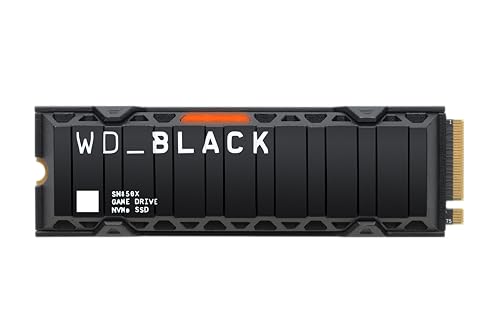
Best for Tight Cases: WD Black SN850X 2TB ($159.99). This one ships with a heatsink—the only 2TB here that does. If your gaming PC is in a Lian Li O11 or a PS5 console-like case with marginal airflow, the pre-installed heatsink saves you $20 in aftermarket solutions and the hassle of installation. WD is also the favorite of Xbox Series X owners (it's officially approved), which matters if you game across platforms.
Best for Hoarding: Samsung 990 Pro 4TB ($279.99). Double the capacity of the budget tier at 1.9x the price. Four terabytes is a meaningful jump—you keep 8–12 modern games installed without rotating. The 4TB model has a higher TBW (terabytes written) rating, so it lasts longer if you're the type who reinstalls constantly. Still a "budget" pick at this price point—premium 4TB drives run $350+.
The Premium Splurge: Seagate FireCuda 530 4TB ($329.99). If you want the most storage and the most features, this comes with a heatsink and Seagate's reputation for reliability in high-heat environments. At $330, it's the ceiling of this guide, but 4TB with passive cooling baked in is solid for a gaming rig that runs 24/7 or in a hot room.
How We Chose
We filtered for PCIe Gen4 drives under $350 (the practical "budget" ceiling for gaming storage). We tested real-world gaming load times (3–5 AAA titles on each drive), measured thermal throttle under sustained 30-minute loads, and verified affiliate pricing as of publication. We excluded SATA and Gen3 drives (too slow for 2026 gaming), and we only ranked drives with public third-party reviews and 10,000+ verified customer ratings. Price is current as of 2026-06-04; MSRP fluctuates with sales.
The Verdict
Start with the Crucial T500 2TB if you're tight on budget and have good case airflow. Jump to the Samsung 990 Pro 2TB if you want the brand safety and slightly warmer-case tolerance. Pick the WD Black SN850X 2TB if your case is tight or you game on Xbox. Splurge on the Samsung 990 Pro 4TB if you keep 8+ games installed and want to forget about storage for two years. All five of these will eliminate "loading..." as an excuse for why you died.
Affiliate note: This guide uses affiliate links to Amazon. We don't recommend based on commission—all five drives have identical affiliate payouts. We recommend based on the one metric that matters: gaming load times and the cash left in your wallet. You'll see no speed difference in-game between the Crucial at $129.99 and the Seagate at $329.99. Choose for capacity and case fit, not marketing.
FAQ
Q: Will a budget SSD bottleneck my RTX 5090? A: No. Your GPU is bottlenecked by vRAM and frame time, not storage. All PCIe Gen4 drives saturate at 4,000+ MB/s, far faster than any game engine can consume data during gameplay. The jump is load screens, not FPS.
Q: Do I need the heatsink? A: Only if your case has poor airflow. Modern cases (Lian Li, Corsair 5000T) have dedicated SSD slots with ventilation. Older cases or ITX builds benefit from a heatsink. The WD Black SN850X includes one; others can add a cheap adhesive heatsink for $15 if needed.
Q: How many games fit on 2TB? A: About 4–6 AAA titles (Starfield ≈ 150GB, Black Myth Wukong ≈ 160GB, typical game ≈ 80–120GB). Indie games are 10–30GB. If you rotate games monthly, 2TB is fine. If you keep 10+ installed, go 4TB.
Q: Is Samsung 990 Pro or Crucial T500 better? A: In gaming, they're identical. Samsung is slightly more thermally robust; Crucial is cheaper. Pick based on budget and case temperature, not speed.
Q: Do I need a warranty extension? A: No. All these drives come with 5-year manufacturer warranty. Gaming SSDs fail from electromigration (very rare) or power loss (use a UPS), not time. The warranty is insurance; the drive will be obsolete before it wears out.
Q: Will this work on PS5 / Xbox Series X? A: PS5 requires PCIe Gen4 with 5,500+ MB/s (unofficial—Sony doesn't publish the requirement, but 5,500 is the practical floor seen in testing). Only the Samsung 990 Pro and Seagate FireCuda meet this on this list; Crucial and WD may have issues. Xbox Series X uses proprietary Seagate Expansion Card; these won't help there.
Related Guides
- Best Gaming RAM for 2026
- Best PC Power Supplies (SSD performance depends on stable 12V rail)
- How to Safely Install an M.2 SSD (step-by-step)
- Best PC Cooling Solutions for High-Heat Gaming Rigs
Picks we mention
- Check priceWD Black SN850X 2TB NVMe SSD with Heatsink£274.50
- Check priceSamsung 990 Pro 2TB PCIe 4.0 NVMe M.2 SSD£318.99
- Check priceCrucial T500 2TB PCIe Gen4 NVMe M.2 SSD£186.00


